CardsGuide to Submit Card Transaction Dispute

Guide to Submit Card Transaction Dispute


Notice an unrecognised transaction on your UOB Credit/Debit Card? Learn how you can report it.

What to do before raising a card transaction dispute:

Card Fee:
Are you referring to Card Annual Fee, Late Fee or Interest Charges instead? If so, please submit your request via Card Fee Waiver.

Merchant name:
Some merchants use a different name for payment processing. Check with merchants on the name used to reflect on cardholders’ statements.

Transaction date:
The transaction date on your card statement may differ from the actual date the purchase was made. This is normal if the merchant name and amount are correct. The date difference is usually due to late posting by the merchant or time zone differences for overseas transactions.

Supplementary cardholder:
Check whether the transactions were made by your supplementary cardholder or by family members who may have used your card.

Step 1: Lock your affected card via the UOB TMRW app

Launch the UOB TMRW app to lock your affected card. This will stop all new attempted transactions / payments immediately.

  • Log in to UOB TMRW app
  • Select the affected card
  • Go to “Services” tab
  • Tap on the “Lock card” icon
  • Prompt is shown to confirm the request
  • Tap “Lock now” to proceed


For more information on how to lock your card, please click here.

Step 2: Call our Call Centre Hotline to file for Disputes:

Please get the relevant information ready to provide to our Customer Service Officer. Please answer as factually as possible as this might impact your case outcome.

You will not be able to change the reason of the dispute request after your reporting.

  • For Service Related: Call our dedicated 24/7 Hotline at 1800 222 2121
  • For Dispute related: Call our dedicated 24/7 Fraud Hotline at 6255 0160


Reasons For Reporting a Transaction Dispute

1. Fraudulent Transactions

Report this if you see card transactions you did not make.

Examples:

  • My card was lost or stolen
  • I was scammed into making a payment
  • My card details were exposed and misused
  • I still have my card, but transactions are not mine (I did not perform the transaction)


2. Duplicate Charges

Report this if you were charged more than once for the same transaction.

Examples:

  • Charged twice for the same goods or services
  • Multiple charges for one ATM cash withdrawal


3. Issues With Goods or Services

Report this if there was a problem with what you ordered.

Examples:

  • Goods or services did not arrive
  • Goods were damaged or incorrect
  • Services did not match what was ordered
  • Cash received was not as requested


4. Cancelled Orders Still Charged

Report this if you cancelled an order but were still charged.

Examples:

  • Refund not received after cancellation
  • Charged instead of receiving a refund
  • Recurring payment charged after cancellation


5. Other Transaction Problems

Report other issues related to a transaction you made.

Examples:

  • Already paid using another method
  • Charged in the wrong currency
  • Charged the wrong amount
  • Charged instead of receiving a refund

Our agent will assist in replacing your card after you have reported your disputed transaction. The card will be sent to your mailing address registered with the bank.
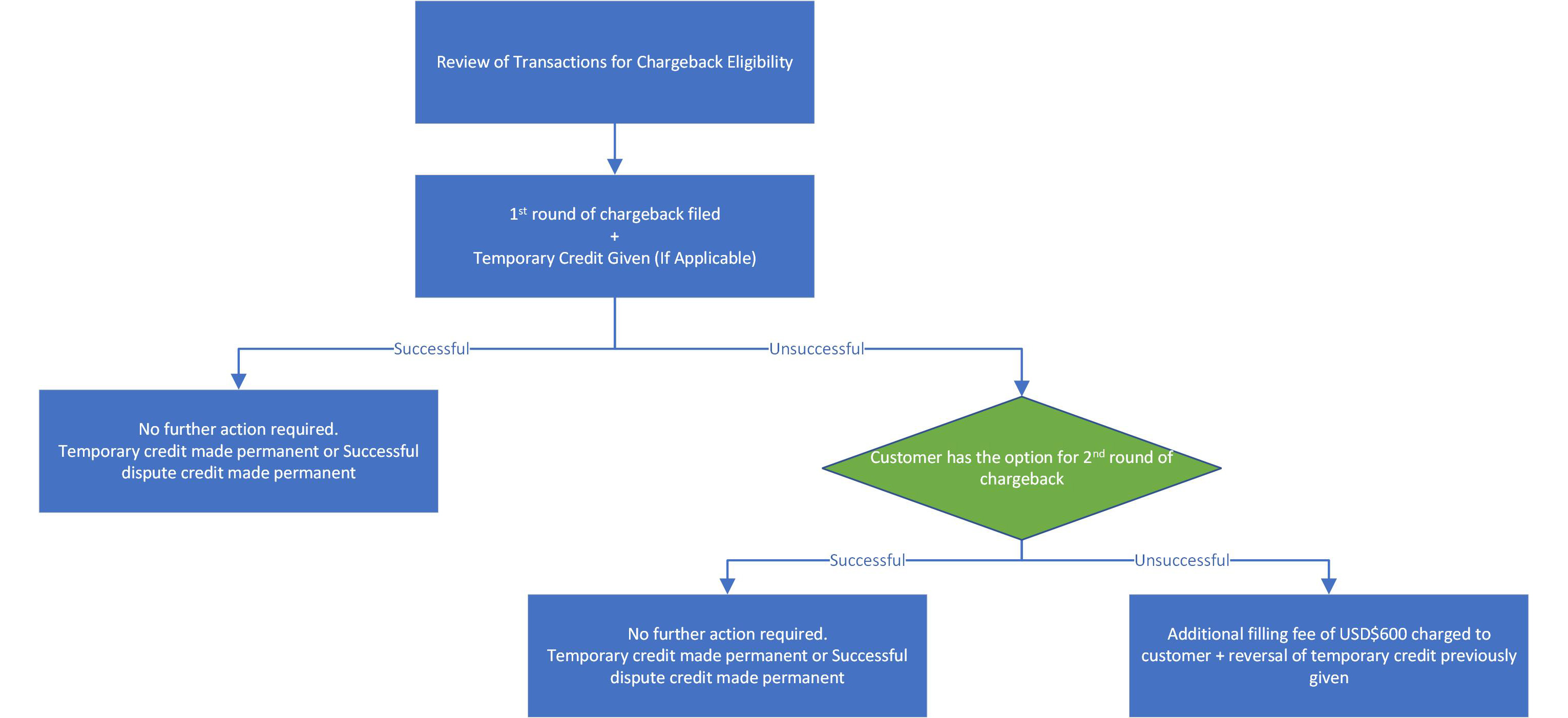

The Bank will review the disputed transaction against the respective Card Scheme rules and, while some transactions may not qualify for chargeback, we will make every effort to assist you in filing a chargeback with the Card Scheme, wherever possible.

We will also assess whether the disputed transaction is eligible for temporary credit. If eligible, temporary credit will be provided while we submit and manage the chargeback with the respective Card Scheme. The 1st cycle will take up to 50 calendar days.

If the outcome of the 1st round of the chargeback is unsuccessful, you may choose to proceed with the 2nd round of the chargeback. The 2nd round of the chargeback will take approximately 45 calendar days, but may take up to 180 calendar days or longer. Please note that if the final outcome from 2nd round of chargeback dispute is unsuccessful, there will be a filing fee of USD$600 payable to the respective Card Scheme and will be debited from your card account.

If the chargeback is successful at any stage, any temporary credit previously given will be made permanent. A permanent credit will be given if temporary credit was not provided earlier.

Terms & conditions may apply.

Safeguard your card by managing your card transaction alerts. You can take control of your cards anytime, anywhere by customizing its functions.

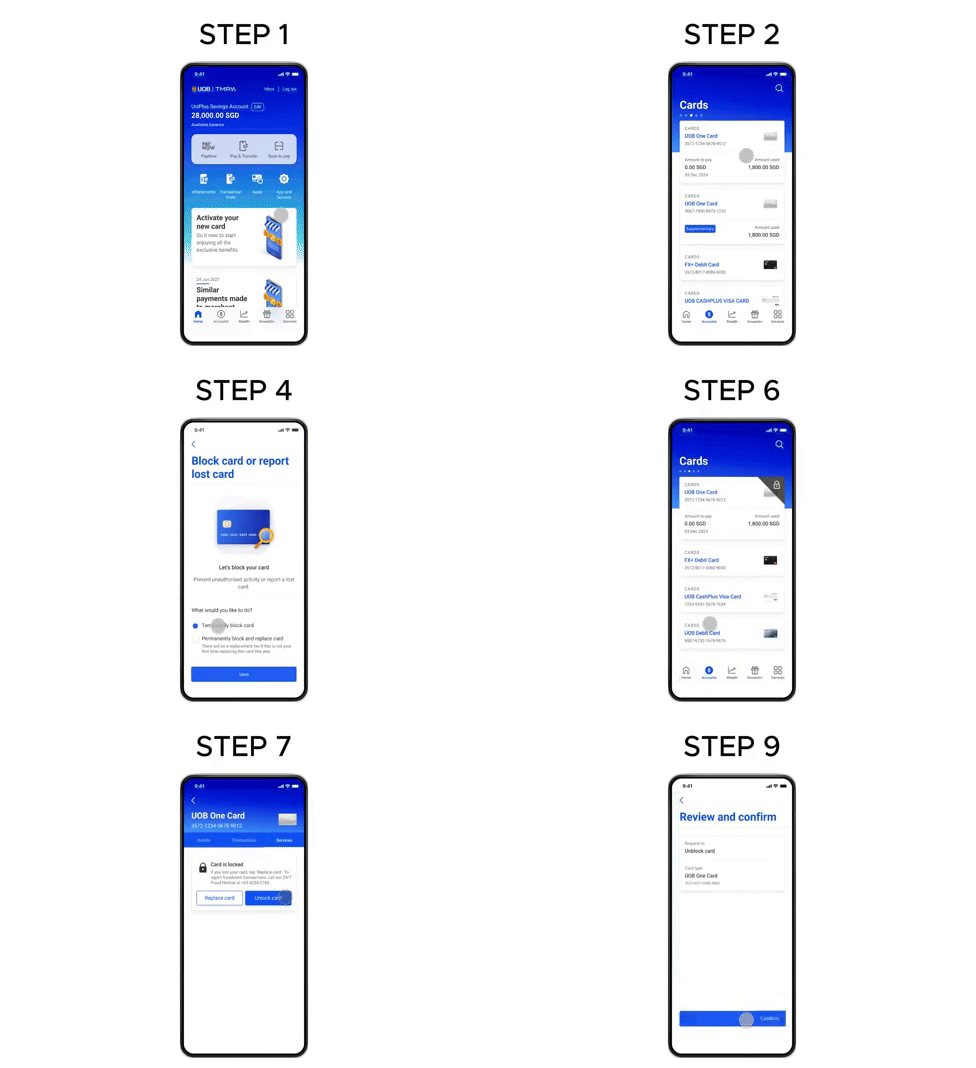
Step 1

Step 1 : Log in to UOB TMRW and tap "Accounts".
Step 2 : Select the affected debit or credit card you wish to block and report.
Step 3 : Go to “Services” tab, and tap on the “Lock card” icon.
Step 4 : There will be a prompt shown to confirm the request. Tap “Lock now” to proceed.
Step 5 : Review details and swipe right to confirm.
Step 6 : Your card has been locked! If you wish to unlock your card, you could tap on the “Lock card” icon on your card summary screen to unlock. 
Step 7 : Tap on “Unblock card”.
Step 8 : Tap on “Next”.
Step 9 : Review details and swipe right to confirm.
Step 10 : Your card has been unblocked! 


Transactions with a lower chance of chargeback success


While we always aim to support you, some transactions may be less likely to be successfully reversed under Card Scheme (VISA, MasterCard, American Express, UnionPay) rules. This is usually because the transaction was authenticated, authorised, or falls outside the scope of chargeback protection. Below are common examples to help you understand when a dispute may have a lower likelihood of success.

Below are common examples to help you understand when a dispute may have a lower likelihood of success.

3D Secure (3DS) is an online security feature used by American Express®, Mastercard®, Visa, and UnionPay to protect cardholders during internet transactions. Merchants using 3DS require customers to verify their identity through One-Time Password via SMS or Digital Token Authentication before a payment is completed.

If an online transaction is authenticated with 3DS, the cardholder is liable for any resulting unauthorized charges under Fraud Related Dispute Reason. To avoid this, always practice safe online habits. Please do not share the password.

Examples:
Phishing – Cardholders are tricked into clicking on fake links (e.g. fraudulent emails or messages) and unknowingly provide their OTP or authentication details, allowing the transaction to be completed with 3DS.

Account Takeover – Fraudsters impersonate the cardholder by gaining access to personal information or login credentials, enabling them to authenticate 3DS transactions as if they were the legitimate cardholder.

Investment Scam - Cardholders are deceived into authorising payments for fake investment opportunities and complete the 3DS verification themselves, making the transaction appear legitimate to the card schemes.

Why likelihood of success may be lower:

3D Secure indicates that additional security authentication was completed, making it harder to challenge the transaction.

Card chip transactions refers to a credit or debit card with an embedded chip that creates a unique code for each purchase, providing enhanced security. This method requires the physical card to be inserted into a chip reader, and the transaction may need to be authorized with a PIN or signature.

Examples:
Losing Wallet / Mobile / Card and used at merchants - A cardholder’s wallet, mobile device, or physical card is lost or stolen, and the card is subsequently used at physical merchants through chip insertion before it is reported and blocked.

Willingly give out card but used without Consent - The cardholder willingly gives their card to another person (e.g. family member, acquaintance, or third party), and the card is later used for transactions without the cardholder’s consent.

Chip Swop (Geninue card chip swapped with fake one) - A genuine EMV chip card is secretly swapped with a counterfeit or tampered card, while the fraudster retains and later uses the original chip card for unauthorised purchases.

Why likelihood of success may be lower:

These transactions are considered authorised transactions by card schemes, which reduces the likelihood of a successful chargeback.

Contactless transactions, including those made through mobile wallets (e.g., Apple Pay, Google Pay, Samsung Pay), allow customers to make secure card present payments by tapping their card, phone, or wearable on an RFID or NFC enabled terminal.

Examples:
Losing Wallet / Mobile / Card and used at merchants - A cardholder’s wallet, mobile phone, or wearable device is lost or stolen and subsequently used at physical merchants to perform unauthorised contactless payments before the card or device is reported and blocked.

Why likelihood of success may be lower:

Contactless transactions are treated as authorised card usage under scheme rules, especially when usage occurs before the loss is reported.

Annual or monthly membership and subscription transactions are recurring payments charged by merchants on a set schedule. You should contact the relevant merchant directly to confirm whether the services have been provided.

Examples:
Forgotten subscription Renewal - The cardholder forgets to cancel a subscription before the renewal date, resulting in an automatic charge for the next billing cycle.

Shared subscription accounts - Subscription account access is shared with family members or friends, and charges are incurred by another user without the cardholder immediately recognising or remembering the usage.

Why likelihood of success may be lower:

Recurring payments agreed to by the cardholder are usually considered valid, even if they were overlooked or shared.

These transactions involve disputes related to issues with goods or services, such as delivery failures or defective products. If you encounter such a dispute, please contact the merchant directly before reaching out to us.

Examples:
Goods not received - The cardholder has been charged but did not receive the purchased goods within the expected or promised timeframe.

Goods received but defective or not as described - The item received is damaged, faulty, or significantly different from what was advertised or agreed upon at the time of purchase.

Service Not provided - Payment was made for a service (e.g. event, subscription, booking), but the service was not delivered as promised.

Partial delivery or missing components - Only part of the order was delivered, or essential components were missing from the shipment.

Cancelled order not returned - The cardholder cancelled the order in accordance with the merchant’s policy, but the refund was not processed or received.

Unsatisfactory quality or “not fit for purpose” - The goods or services delivered do not meet reasonable quality standards or cannot be used for their intended purpose.

Why likelihood of success may be lower:

These disputes often require strong supporting evidence and proof that you have first attempted to resolve the issue directly with the merchant.

Important to know
  • Each case is assessed individually based on card scheme rules
  • Supporting documents play a critical role in dispute outcomes
  • A dispute submission does not guarantee a refund
  • Terms and conditions may apply

If you’re unsure whether your transaction qualifies, you can contact us and we can guide you on the appropriate next step.

FAQs (Frequently Asked Questions) for Card Transaction Dispute submission

If a temporary credit is issued, you do not need to pay the disputed transaction or related charges during our investigation. However, all other undisputed transactions must still be paid.

For unauthorised disputed transactions, we will provide a temporary credit for the disputed amount and related charges while the investigation is ongoing. This means you do not need to pay the disputed amount during this period. Please continue to pay all undisputed amounts by the payment due date. After the investigation, any temporary credit may be made permanent or reversed depending on the outcome, and records will be updated where applicable.

For the other disputed transactions, the Bank will advise whether a temporary credit will be provided or whether you are required to pay the total amount due on your statement by the payment due date. After the investigation, any temporary credit (if provided) may be made permanent or reversed depending on the outcome, and records will be updated where applicable.

If you have concerns about the outcome, you may contact UOB’s 24-hour Service Hotline at 1800 222 2121. If the matter remains unresolved after further review, you may refer your case to the Financial Industry Disputes Resolution Centre (FIDReC) at 6327 8878 or submit an enquiry via www.fidrec.com.sg.

Once the dispute is escalated to FIDReC, you may continue withholding payment for the disputed amount and related charges. Your credit bureau records will not be negatively affected while FIDReC conducts its review, which may include mediation and/or adjudication.

Where non-payment of the disputed transaction has already been reported to Credit Bureau Singapore (CBS), the Bank will update the CBS records upon the conclusion of FIDReC mediation and/or adjudication, provided you are found not liable for the disputed transaction.

Please ensure you review your statements in a timely manner.

You should submit your dispute as soon as possible, and within 100 calendar days from the transaction date.

Submission within this time period will allow sufficient time for the bank to process the case and lodge a chargeback. All chargeback requests are subject to the Card Scheme Rules, which allow a maximum dispute window of 120 calendar days from the transaction date.

For disputes submitted more than 100 calendar days from the transaction date, it will be considered only if there is a valid reason for delayed submission. You may be required to produce supporting documents (e.g. hospitalisation discharge summary / hospitalisation leave etc.) to support your reason.

Your Credit Bureau records are generally not affected while we investigate a disputed transaction, as long as you make payments according to Contact Centre’s advice.

For unauthorised disputed transactions, we will provide a temporary credit for the disputed amount and related charges while the investigation is ongoing. This means you do not need to pay the disputed amount during this period. Please continue to pay all undisputed amounts by the payment due date. After the investigation, any temporary credit may be made permanent or reversed depending on the outcome, and records will be updated where applicable.

For the other disputed transactions, the Bank will advise whether a temporary credit will be provided or whether you are required to pay the total amount due on your statement by the payment due date. To ensure your Credit Bureau records are not affected, please follow the Bank’s payment instructions and continue to pay all undisputed amounts on time. After the investigation, any temporary credit (if provided) may be made permanent or reversed depending on the outcome, and records will be updated where applicable.

Monitor all your transaction-related notifications

  • Make sure to provide UOB with your latest Singapore mobile number and email address. If there are changes to your contact details, update us promptly.
  • Ensure that you opt in to receive all notifications.
  • Make sure the phone or device you are using can receive transaction notifications from UOB in real time.
  • Monitor all notifications and alerts you receive from UOB promptly without further reminders or repeat notifications.


Protecting your access codes

  • Never share your access code with anyone else, including any UOB staff, staff from other banks, or government officials.
  • Do not disclose the access code in a recognisable way on any payment account, authentication device, or any container for the payment account (e.g. eWallets).
  • Keep your access code safe at all times – if you write it down or have it saved somewhere, make sure it’s in a secure location and that no one else can access it.


Ensure that you secure all access to your account(s)

You should at the minimum:

  • Download UOB TMRW App only from official sources (e.g. Apple App Store, Google Play Store and Huawei AppGallery).
  • Update your device’s browser (e.g. Chrome, Safari, Internet Explorer, Firefox) to the latest version available.
  • Patch the device’s operating systems (e.g. Windows operating system (OS), Macintosh OS, iOS and Android OS) with regular security updates provided by the operating system provider.
  • Install and maintain the latest anti-virus software on the device, where applicable.
  • Use strong passwords (e.g. a mixture of letters, numbers and symbols) or strong authentication methods made available by the device provider (e.g. facial recognition or fingerprint authentication).
  • Do not root or jailbreak the devices you use.
  • Do not download or install applications from third-party websites outside official sources (“sideload apps”), especially unverified apps that request device permissions unrelated to what you plan to use them for.


You (as the accountholder) and your account users shall be responsible for following the latest security guidelines published by UOB, which UOB may update from time to time. As the accountholder, you must also inform all your joint accountholders and your account users of the latest security guidelines published by UOB.

Reading content of messages containing the access codes before completing payment transactions or high-risk activities.

Read the messages that come with access codes (e.g. OTPs sent via SMS or push notifications sent via UOB TMRW App). Make sure the action you are about to take or the recipient of your payment is correct before completing it with the access code.

Referring to official sources to obtain UOB’s website addresses and phone numbers

  • Refer to official sources, e.g. the MAS’ Financial Institutions Directory, UOB TMRW App or the back of UOB Cards, e.g., credit card, debit card (“official sources”) for UOB’s website addresses and phone numbers
  • Contact UOB only through contact details from official sources.


Links and QR Codes

Do not open any links or scan any QR codes that appear to be sent from UOB – for security reasons, we will not be sending you any links or QR codes, unless you have asked us for such links or QR codes.

Understanding the risks and implications of performing high-risk activities

Read the risk warning messages from UOB before confirming any high-risk activities.

If you do not understand the risks and implications of these high-risk activities, you may find out more information from UOB’s website before you perform these activities. You are taken to have understood the risks and implications of these activities if you proceed to perform them.

Reporting unauthorised activities on your account(s)

You must report any unauthorised transactions to UOB within 30 calendar days after receiving the relevant notification or alert for it (e.g. actions that are not initiated by you or with your consent for payment transaction, high-risk activities or the activation of a digital security token.).

Report any unauthorised transaction at any UOB branch, or via UOB’s 24-hour Fraud Hotline at 6255 0160. If you submit a report late (after 30 calendar days), we may need you to provide reasons for the delay.

Activating self-service feature (“Kill Switch”)

If you are notified of an unauthorised transaction and suspect your account(s) has been compromised or if you are unable to contact UOB, activate the Kill Switch feature provided by UOB as soon as you can. This will block further mobile and online access to your account(s) and all your debit/credit cards.

The Kill Switch feature is available via UOB’s 24-hour Fraud Hotline – call 6255 0160 and select ‘4’ to activate the Kill Switch.

Providing information on unauthorised transaction

You should promptly provide UOB with all the information we may request to facilitate our investigation of the unauthorised transaction.

Such information may include:

  • the UOB accounts affected,
  • affected accounts with other banks,
  • your identification information,
  • the name or identity of any account user for your account,
  • the date and time of the loss or misuse of your account,
  • your authentication device or access code,
  • the type of authentication device used to perform the payment transaction, and
  • access code and device used to perform the payment transaction.


If an access code is applicable to your account, we may also need to know:

  • how you or your account user recorded the access code,
  • if you or your account user had disclosed the access code to anyone else,
  • any other relevant information that you know, such as but not limited to:
    • a description of the scam incident, including details of the communications with the suspected scammer(s),
    • details of the remote software downloaded (if any) as instructed by the scammer(s),
    • whether you received any OTPs or transaction notifications sent by UOB (if possible, a confirmation from your telecommunication operator to verify the receipt status), and
    • The suspected compromised applications (if any) in your or your account user’s device.


Making a police report

If you suspect you may be a victim of scam or fraud, you should also make a police report as soon as you can, even if no unauthorised transactions were made on your account.

Please provide us with a copy of the police report lodged by you within 3 calendar days of reporting an unauthorised transaction to us to facilitate our claims investigation process.

You should cooperate with the police and provide evidence (e.g. your mobile device for forensics investigation) as far as you can.

Step 1: Lock your affected card via the UOB TMRW app

Launch the UOB TMRW app to lock your affected card. This will stop all new attempted transactions / payments immediately.

  • Log in to UOB TMRW app
  • Select the affected card
  • Go to “Services” tab
  • Tap on the “Lock card” icon
  • Prompt is shown to confirm the request
  • Tap “Lock now” to proceed


For more information on how to lock your card, please click here.

Step 2: Call our Call Centre Hotline to file for Disputes.

Please contact the Bank’s through its UOB’s 24-hour Fraud Hotline at 6255 0160 or its digital banking platform (if applicable) to lodge your dispute.

We will advise you on the dispute lodgment process which could require you to submit a dispute resolution form and any applicable supporting documentation, which would include a police report.

If you suspect your Card or Card Account has been compromised or you are unable to contact the Bank, consider using the self-service ‘kill switch’ feature to block and disable access to your Card and Card Account.

Please raise a dispute with the respective app store that you have downloaded the app from.

Please refer to the links below and perform the steps required.

You may reach out to the Bank if the respective app providers are not able to resolve your dispute.

Useful links:
Apple Store: https://support.apple.com/en-sg/118223
Google Pay: https://support.google.com/googleplay/answer/2851610?hl=en
Samsung Galaxy Store: https://www.samsung.com/sg/support/apps-services/can-i-get-a-refund-for-an-app-or-in-app-item/

We’re here to help

Help and support for 
your banking needs
Help and support for 
your banking needs

Discover our Personal Banking FAQs

Discover our Personal Banking FAQs

Explore our step-by-step guides

Explore our step-by-step guides