UOB ATM card upgrade

Better security for a greater peace of mind
As part of the Bank’s effort to enhance card transaction security, we are progressively upgrading all existing UOB magnetic stripe ATM cards to UOB chip cards from October 2013 to 31 December 2014 for better protection against fraudulent activities.UOB Chip Cards
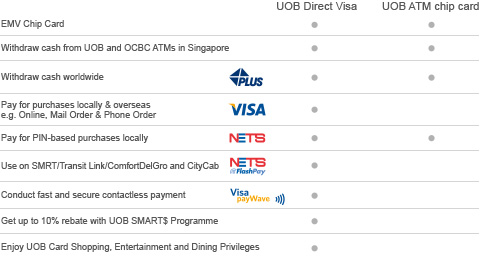
You can upgrade to any of the following 2 UOB chip cards:
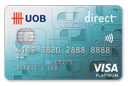 UOB DIRECT VISA DEBIT CARD |
|
|
 UOB ATM CHIP CARD |
| |
 |
||
How do I get my new UOB chip card?1. Via any UOB branch Upgrade your existing UOB ATM card immediately at any UOB branch today. 2. Via post We will progressively contact all our customers about their new UOB chip cards from October 2013 to December 2014. Please ensure that your contact details including mailing address are up-to-date to receive the latest notifications from us. You may update your details through the following ways:
Alternatively, you may visit any UOB branch to get your new chip card. | ||
Upgrade to UOB Direct Visa
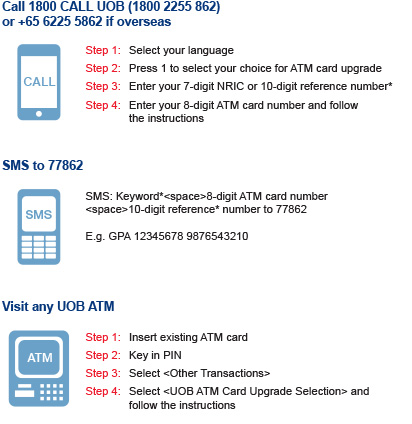
If you have received an ATM card upgrade letter from UOB, you may upgrade your UOB magnetic stripe ATM card to a UOB Direct Visa Debit Card through the following means: |
 |
|
 |
||
| *The 10-digit reference number and SMS keyword is indicated in your ATM card upgrade letter. Please note:
|
||
How to Activate
You will need your existing UOB ATM card to activate your new UOB chip card*.
Here is a quick guide:

If you have received your new UOB chip card via post*, your existing UOB ATM card will be deactivated on the date indicated in the letter or when you activate your new UOB chip card, whichever is earlier.
For more information, please read the Frequently Asked Questions or call our customer service hotline at 1800 CALL UOB (1800 2255 862) or (65) 6225 5862, if overseas.
* The card activation method may vary. Please follow the instructions sent to you in your card mailer accordingly.
Watch a quick video on how to activate your UOB chip card:
FREQUENTLY
ASKED QUESTIONS
- UOB CHIP CARD UPGRADE EXERCISE
-
UPGRADING TO UOB DIRECT VISA DEBIT CARD
- What is the difference between a UOB Direct Visa Debit Card and an ATM chip card?
-
ACTIVATING YOUR UOB CHIP CARD
 UOB branch
 1800 CALL UOB (1800 2255 862)